OverviewSignetSemaForeCuriousLee
Product

Offline 2FA. No server copy.

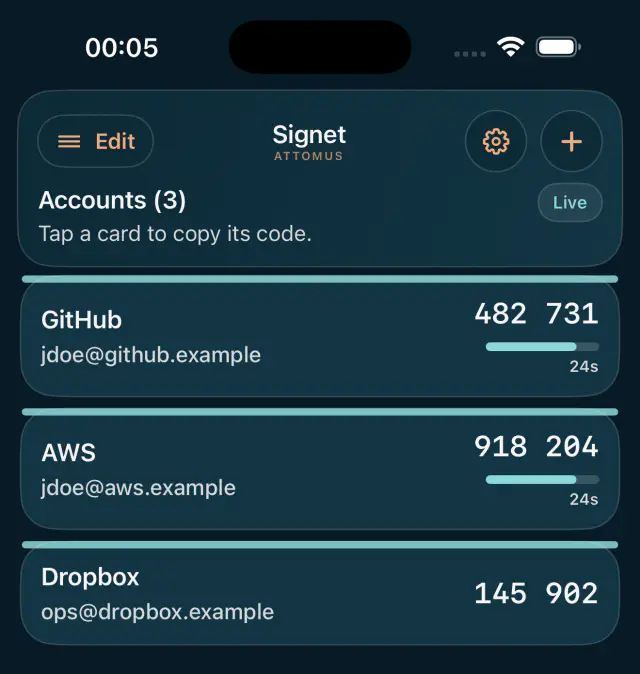
Attomus Signet generates TOTP and HOTP codes entirely on-device.

No account. No cloud sync. No telemetry. Yours.

Attomus Signet showing authentication codes generated on-device
Offline by default
No server copy
Biometric-gated
Encrypted backups
Open OTP standards
The trust chain problem

Every other authenticator puts someone else in your chain.

Google Authenticator syncs to your Google account. Microsoft Authenticator connects to Microsoft infrastructure. Authy requires registration and keeps a copy on Twilio servers. They are not bad products, but they all involve a third party you did not choose and cannot remove. Attomus Signet does not. Your secrets are generated, stored, and used entirely on-device. The app makes zero network requests — not fewer. Zero.

No account. No cloud sync. No telemetry. No server-side trust chain. If there is no server, there is nothing to breach.

Platform iOS 16+ · Android 10+
Network requests Zero
Account required No
Cryptography Open · github.com/attomus/attomus-otp
Licence Apache 2.0
Why Attomus Signet

Built for local control, open standards, and backups you own.

Hardware-backed key storage

Each account has its own hardware-backed wrapping key. Android uses StrongBox where available and TEE-backed Keystore otherwise; iOS uses Secure Enclave-backed protection. The privacy panel shows the protection level for each account. There is no single master key to steal.

Biometric-gated sessions

Biometrics open a session. During that session, Attomus Signet loads your keys into memory, computes codes, and shows them live. When the session expires, or the app moves to the background, keys are cleared and the app locks. A biometric-enrolment change also locks the session and requires authentication again; it does not destroy your keys.

Encrypted local backups

Export an encrypted backup file using Argon2id key derivation and AES-256-GCM. You set the passphrase and choose where the file goes. Attomus Signet reports any account it could not include rather than silently presenting a partial export as complete. Attomus cannot read, sync, reset, recover, or restore the file for you.

Short-lived exposure

Attomus Signet locks whenever it moves to the background. Codes copied to the clipboard are cleared after 60 seconds, and Android marks copied codes as sensitive where the platform supports it. The controls narrow the useful window without pretending a live code can be invisible.

Deletion means deletion

Deleting an account removes its encrypted record and destroys its dedicated wrapping key. Attomus Signet cannot reconstruct it afterwards. Keep an encrypted backup if you may need the account again.

Open standards. Auditable code.

Attomus Signet supports RFC 6238 TOTP and RFC 4226 HOTP through AttomusOTP, our open-source Swift and Kotlin OTP library. No proprietary algorithm. No black-box code. Compatible with any service using the standard otpauth:// format.

Assurance

Security claims should withstand inspection.

Attomus Signet has been assessed against CREST-style methodology across iOS and Android. The assurance record covers architecture decisions, remediation, fuzzing and release-gate evidence.

Review the assurance record
Questions

What people ask before they download.

What happens if I lose my phone?
The backup export is an encrypted file protected by a passphrase you set. Restore it on a new device and your accounts are back. If you did not create a backup before losing the device, the accounts are gone — there is no server-side copy and no recovery path. That is not a deficiency; it is how the security model works.
How do I add or restore accounts?
Scan the QR code supplied by the service or enter its setup details manually. To restore Attomus Signet accounts, open an encrypted .attomusauth backup and enter its passphrase. Provisioning and restore are performed on your device.
Does it work with my service?
If a service supports TOTP or HOTP — which is any service that shows a QR code when setting up two-factor authentication — Attomus Signet works with it. That includes GitHub, AWS, Cloudflare, Microsoft, Google Workspace, Stripe, and any other service using the standard otpauth:// format.
How do I know the cryptography is correct?
The TOTP and HOTP implementation is in AttomusOTP, a standalone open-source library published in full on GitHub. The implementation is hand-rolled against RFC 6238 and RFC 4226 with no third-party cryptographic dependencies. You can read every line of it.
What does "biometric-gated" actually mean?
Biometrics open a session. When you authenticate, Attomus Signet loads your secret keys into memory and begins computing codes — that is what makes the live countdown display possible. Your keys remain in memory for the duration of the session, which has a configurable timeout. When the session expires or the app moves to the background, keys are cleared and the app returns to a locked state. A biometric-enrolment change also locks the session and requires authentication again; it does not destroy your keys.
Who built this and why should I trust it?
Attomus Signet is built by Attomus, a cybersecurity firm that works with the UK Home Office, Ministry of Defence, and major defence contractors. We built it because we needed an authenticator we could recommend to clients and use ourselves — one with no third-party trust chain, no telemetry, auditable cryptography, and documentation that is honest about the security model. It is free to download. The cryptographic library that powers it is open source.

Built by Attomus — cybersecurity specialists trusted by the Home Office, Ministry of Defence, and Boeing. About Attomus →

Download

Free on iOS and Android.