Android can attest RSA and EC keys, but AES keys are different. Here is what the Keystore can prove, what it cannot, and how to design around that boundary.
Part 2 of 5 in Building Signet
There is a question that comes up constantly in Android security engineering, usually phrased something along the lines of: “how do I prove to my server that this AES key is hardware-backed?” The common answers to this question are often wrong in that they make you think you have a guarantee that you do not have.
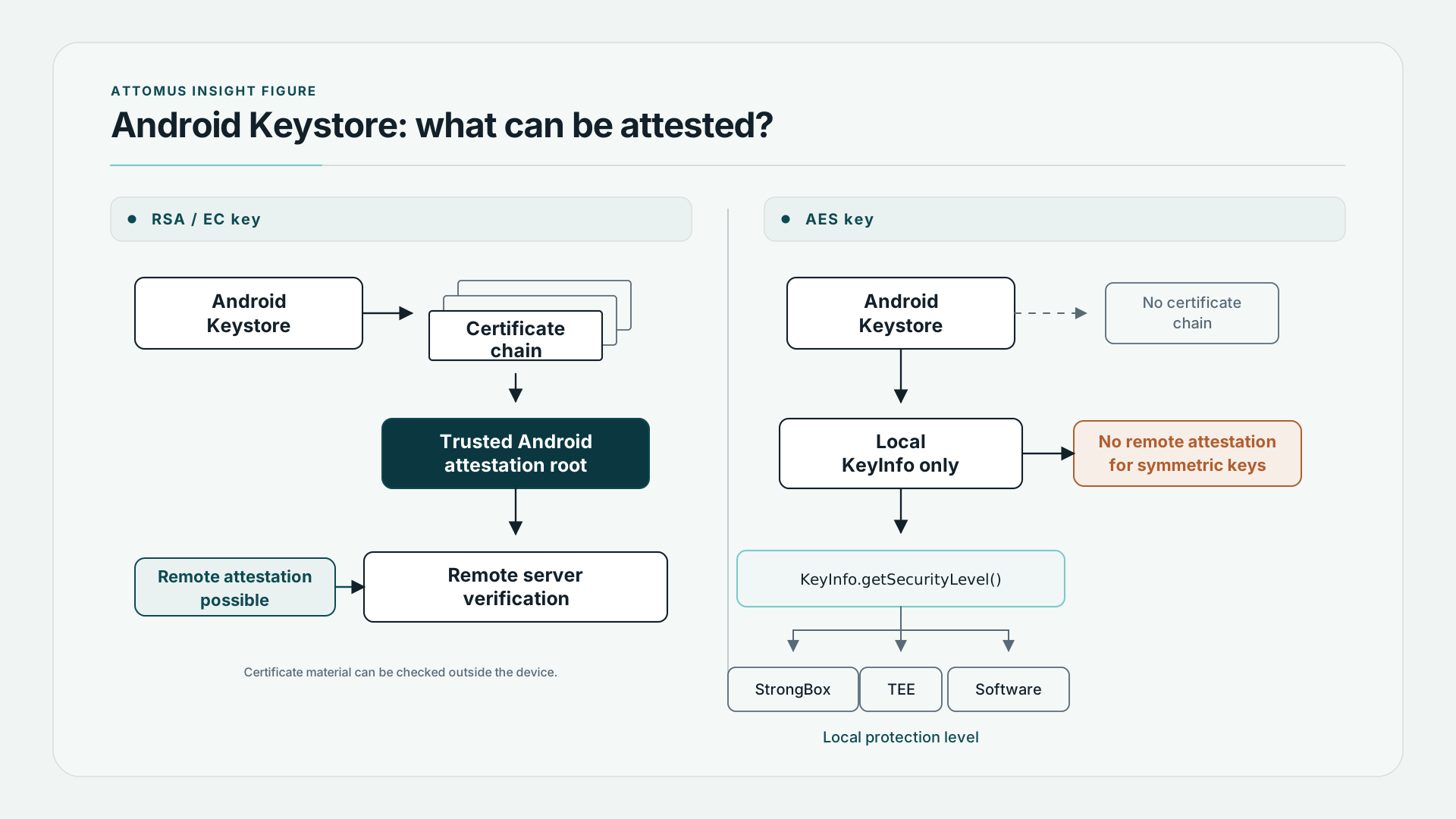
The short answer is: you cannot prove an AES key’s hardware provenance to a server directly. The certificate chain mechanism that makes remote attestation possible for asymmetric keys does not exist for symmetric keys. If you are building a system that depends upon being able to remotely attest an AES key’s provenance, you need to redesign the system, not find a better API call.
Here is what is actually happening and how to work with it correctly.
What attestation actually means for asymmetric keys
Android’s hardware attestation mechanism works as follows for RSA and EC keys: when you generate a key inside the Android Keystore and request attestation, the Keystore produces a certificate chain. The leaf certificate describes your key and its usage properties. The chain is signed back to a trusted Android attestation root whereby a remote server that trusts that root can verify the chain and conclude, with reasonable confidence, that the described key exists in hardware on a device that passed the relevant certification programme.
This is powerful. It is also the exact approach many try to apply to AES keys, but it cannot work.
val keyStore = KeyStore.getInstance("AndroidKeyStore").apply { load(null) }

// For an RSA or EC key, this works
val certChain = keyStore.getCertificateChain("my-ec-key")
// certChain[0] describes the key; chain goes back to Google's root

// For an AES key, this returns null
val symChain = keyStore.getCertificateChain("my-aes-key")
// symChain is null. No exception. Just null.
The reason is not an API oversight. It is a fundamental property of how attestation works. Attestation produces a signed statement: “a key with these properties exists in this piece of hardware.” For an asymmetric key, the Keystore can produce that statement without exposing the private key, because the certificate contains the public key. The statement can be independently verified.
For a symmetric key, there is no public component. Any certificate that described the key would either reveal key material or describe something too vague to be useful - the attestation model does not translate. The hardware manufacturers know this and have not built in the support because there is nowhere useful to go with it.
The right API: KeyInfo.getSecurityLevel()
Instead what one can do is check the security level of a symmetric key locally using KeyInfo. This is a different guarantee — it tells you, on the device, what level of hardware protection the key actually has — but it is not remotely verifiable, and the check is running in the same process that holds the key.
val keyStore = KeyStore.getInstance("AndroidKeyStore").apply { load(null) }
val secretKey = keyStore.getKey("my-aes-key", null) as SecretKey

val factory = SecretKeyFactory.getInstance(secretKey.algorithm, "AndroidKeyStore")
val keyInfo = factory.getKeySpec(secretKey, KeyInfo::class.java) as KeyInfo
On API 31 (Android 12) and above:
val level = keyInfo.securityLevel

when (level) {
    KeyProperties.SECURITY_LEVEL_STRONGBOX ->
        // Key is in a dedicated tamper-resistant secure element (StrongBox)
    KeyProperties.SECURITY_LEVEL_TRUSTED_ENVIRONMENT ->
        // Key is in the TEE — isolated from the main processor but not a separate chip
    KeyProperties.SECURITY_LEVEL_SOFTWARE ->
        // Key is not hardware-backed at all — exists in the normal process
}
On API 23 through 30, the older API:
// Deprecated in API 31 but still works below it
val isHardwareBacked = keyInfo.isInsideSecureHardware
The distinction between StrongBox and TEE matters more than most documentation suggests. A TEE (Trusted Execution Environment) is an isolated partition of the main processor running a small trusted OS. It is significantly more secure than software key storage, but it shares silicon with the main processor. StrongBox is a separate, physically distinct chip — a dedicated secure element — with its own processor, memory, and certified tamper resistance. On devices that have it, it is meaningfully more resistant to physical attack.
Not all devices have StrongBox. Requesting it during key generation can fail:
try {
    val spec = KeyGenParameterSpec.Builder(
        "my-aes-key",
        KeyProperties.PURPOSE_ENCRYPT or KeyProperties.PURPOSE_DECRYPT
    )
        .setBlockModes(KeyProperties.BLOCK_MODE_GCM)
        .setEncryptionPaddings(KeyProperties.ENCRYPTION_PADDING_NONE)
        .setKeySize(256)
        .setIsStrongBoxBacked(true)
        .build()

    val gen = KeyGenerator.getInstance(KeyProperties.KEY_ALGORITHM_AES, "AndroidKeyStore")
    gen.init(spec)
    gen.generateKey()

} catch (e: StrongBoxUnavailableException) {
    // Device does not have StrongBox. Fall back to TEE by retrying without setIsStrongBoxBacked.
}
The right pattern is to attempt StrongBox, catch the exception, regenerate without it, and then read back securityLevel to record what you actually got. Record it alongside the key metadata so you can show users (or log to your own diagnostics) the actual protection level, not the level you requested.
Where the common answers go wrong
The answer that circulates most widely goes something like this: generate an EC key pair alongside your AES key, use the EC key’s certificate chain to attest the device, and then treat the AES key as attested by proxy. The reasoning being that if the device is genuine and the EC key is in StrongBox, then presumably the AES key is too.
This is not attestation. It is an inference - the word ‘presumably’ has no place in the security space. The certificate chain proves the EC key is in a specific piece of hardware on a specific device. It says nothing about the AES key. One can generate them in the same session on the same device, but the chain does not cover the AES key and cannot be made to.
The second wrong answer is to check isInsideSecureHardware on API 23+ and treat it as a remotely verifiable guarantee. It is not. The check runs in your process. A compromised device could return true for any key. The check is useful for local UI (showing users their protection level) and for internal validation logic, but it is not a trust anchor for a server-side verification scheme.
What you can actually build
If your architecture requires a server to verify key provenance, the only sound approach is to generate an RSA or EC key pair, use hardware attestation to verify that pair is in hardware, and then use that key pair to protect or authenticate operations involving your symmetric key material. The symmetric key never leaves the device; the asymmetric key pair provides the attestable anchor.
If your architecture just needs to inform users about their protection level, KeyInfo.getSecurityLevel() is exactly right. Show them what they have. Record what you obtained at the time of key generation so that you can surface it accurately later without querying it on every code display. And be honest in your documentation about what the levels mean: StrongBox and TEE are both real hardware protection, but they are not the same thing, and a security-conscious user deserves to know which one they have.
The short version for anyone who landed here from a search: getCertificateChain() returns null for AES keys on Android because hardware attestation does not exist for symmetric keys. Use KeyInfo.getSecurityLevel() instead. It will not give you remote attestation, but it will tell you the truth about what the hardware is doing.
Attomus Signet — offline 2FA, on the App Store and Google Play. Read the Signet assurance record.